Docs › Using Zalosim
Unit operations
What each object in the palette does, which ports it has, what you must give it before it solves, and what it reports.
Common to every operation
Every operation's property view has the same frame (see Property views). Most have these tabs:
- Design: Connections (name and one picker per port), Parameters (the operation's own inputs), User Variables and Notes. Some operations add pages here.
- Rating: sizing checks for separators, valves, heat exchangers and pumps, curves for pumps, compressors and expanders, and the pipe profile for pipe segments. Rating figures never change the solution.
- Worksheet: the attached streams side by side (Conditions, Properties, Composition). You can type feed conditions here, and outlet conditions the operation accepts.
- Performance: the results, once solved.
Until an operation has everything it needs, its status strip is amber and says what is missing, for example Requires a feed stream, Requires a product stream or feed stream 1: Unknown Flow (its feed is not solved yet). New operations are named with a prefix and a number from 100 (VLV-100, E-101); logical operations are numbered from 1 (ADJ-1).
The palette at a glance
| Palette group | Objects | Name prefix |
|---|---|---|
| Streams | Material Stream | 1, 2, 3… |
| Heat Transfer | Heater, Cooler, Heat Exchanger | E |
| Piping & Hydraulics | Mixer, Tee, Valve, Pipe Segment | MIX, TEE, VLV, PIPE |
| Separator | Separator, 3-Phase Separator, Component Splitter | V, X |
| Pressure Changer | Pump, Compressor, Expander | P, K |
| Manipulator | Recycle, Balance, Adjust, Set, Spreadsheet | RCY, BAL, ADJ, SET, SPRDSHT |
| Columns (own tab) | Distillation Column, Absorber, Refluxed Absorber, Reboiled Absorber, Shortcut Column | T |
Adjust, Set and Spreadsheet are described in Logical operations.
Mixer
Combines several streams into one, adiabatically.
| Ports | Inlets (several), Outlet |
|---|---|
| You give | Nothing beyond solved feeds. On Parameters, choose the outlet pressure rule: Set Outlet to Lowest Inlet (default), Average or Highest Inlet. |
| Results | The outlet stream (no Performance figures). |
Tee
Splits one stream into several with the same composition, temperature and pressure.
| Ports | Inlet, Outlets (several) |
|---|---|
| You give | A flow ratio for each outlet on Parameters. One may be left empty: it takes the rest. Ratios must lie between 0 and 1 and add up to 1. |
| Messages | Unknown flow ratio (more than one left empty), Flow ratios must sum to 1 |
Valve
Drops the pressure at constant enthalpy, so a gas usually cools and a liquid may partly flash.
| Ports | Inlet, Outlet |
|---|---|
| You give | Delta P on Parameters, or the outlet pressure on the outlet stream. Entering one clears the other. |
| Results | Delta P |
| Rating › Sizing | Inputs: pressure ratio factor xT (default 0.72) and rated Cv. Outputs: required Kv and Cv to IEC 60534, expansion factor (gas) and linear opening when a rated Cv is given. Choked vapour flow is flagged. |
| Messages | Unknown Delta P, Outlet pressure higher than inlet |
Heater and Cooler
Adds heat to (Heater) or removes heat from (Cooler) a stream. The energy stream is created with it.
| Ports | Inlet, Outlet, Energy |
|---|---|
| You give | One of: Duty, Delta T, the outlet temperature or the outlet vapour fraction (on the outlet stream). Entering one clears the others. Delta P defaults to 0. |
| Results | Duty, Delta T |
| Messages | Unknown Duty; warnings Negative duty: the cooler is heating or …the heater is cooling |
Duty is positive in the operation's own sense: heat added for a heater, heat removed for a cooler.
Pump
Raises the pressure of a liquid.
| Ports | Inlet, Outlet, Energy |
|---|---|
| You give | One of: Delta P, Pressure Ratio, Duty (power), or the outlet pressure on the outlet stream. Adiabatic Efficiency defaults to 75 %. |
| Results | Power, Delta P, Head |
| Rating › Sizing | Enter the NPSH required (from the pump curve) to see NPSH available, feed vapour pressure and the NPSH margin. The feed must be all liquid. |
| Rating › Curves | Tick Enable Curves and enter points of flow, head and efficiency (at least two). With a curve speed and an operating speed the curve is scaled by the fan laws. With curves on, the head at the feed flow sets the pressure rise (leave the pressure empty), or give the outlet pressure and leave the feed flow empty to find the flow. |
| Messages | Unknown Delta P, Outlet pressure lower than inlet, warning Pump inlet contains vapour |
Compressor and Expander
A compressor raises the pressure of a gas and takes power; an expander lowers it and gives power.
| Ports | Inlet, Outlet, Energy |
|---|---|
| You give | The outlet pressure, on the outlet stream. On Parameters choose the EFFICIENCY BASIS, Adiabatic (default) or Polytropic; the efficiency defaults to 75 %. |
| Results | Power, Adiabatic efficiency, Isentropic outlet temperature, Adiabatic head, and Polytropic exponent (polytropic basis) |
| Rating › Curves | As for the pump, with adiabatic or polytropic head to match the efficiency basis. |
| Messages | Unknown Delta P, Outlet pressure lower than inlet (compressor) or higher than inlet (expander), warning Inlet contains liquid |
The Parameters page also has a Duty field, but a duty alone does not solve the compressor: give the outlet pressure (directly, or through an Adjust or Set).
Separator and 3-Phase Separator
Flashes the combined feeds and splits the phases. The 3-Phase Separator also draws off free water (or a second liquid).
| Ports | Inlets (several), Vapour (top), Liquid (bottom), Water (3-phase only), Energy |
|---|---|
| You give | Nothing beyond solved feeds and connected products. Delta P and Duty default to 0 (an adiabatic flash at the lowest feed pressure). |
| Results | Vapour fraction of feed |
| Rating › Sizing | Vertical or horizontal vessel. Enter diameter, height (or length), liquid level fraction (default 0.5) and the Souders-Brown K (default 0.107). Outputs: vessel and liquid volume, liquid residence time, vapour velocity, maximum vapour velocity and vapour loading. A loading above 1 means the vapour space is too small for drops to settle. |
| Messages | Requires a vapour product stream (and liquid, water); warning Feed is single phase |
For oil, gas and water, tick Liquid-liquid split on the fluid package's StabTest tab. Without it the 3-phase separator warns that its feed flashed without a water phase, so the vessel temperature is not reliable. See StabTest.
Heat Exchanger
Exchanges heat between two streams, tube side and shell side, counter-current. The hotter inlet is treated as the hot side.
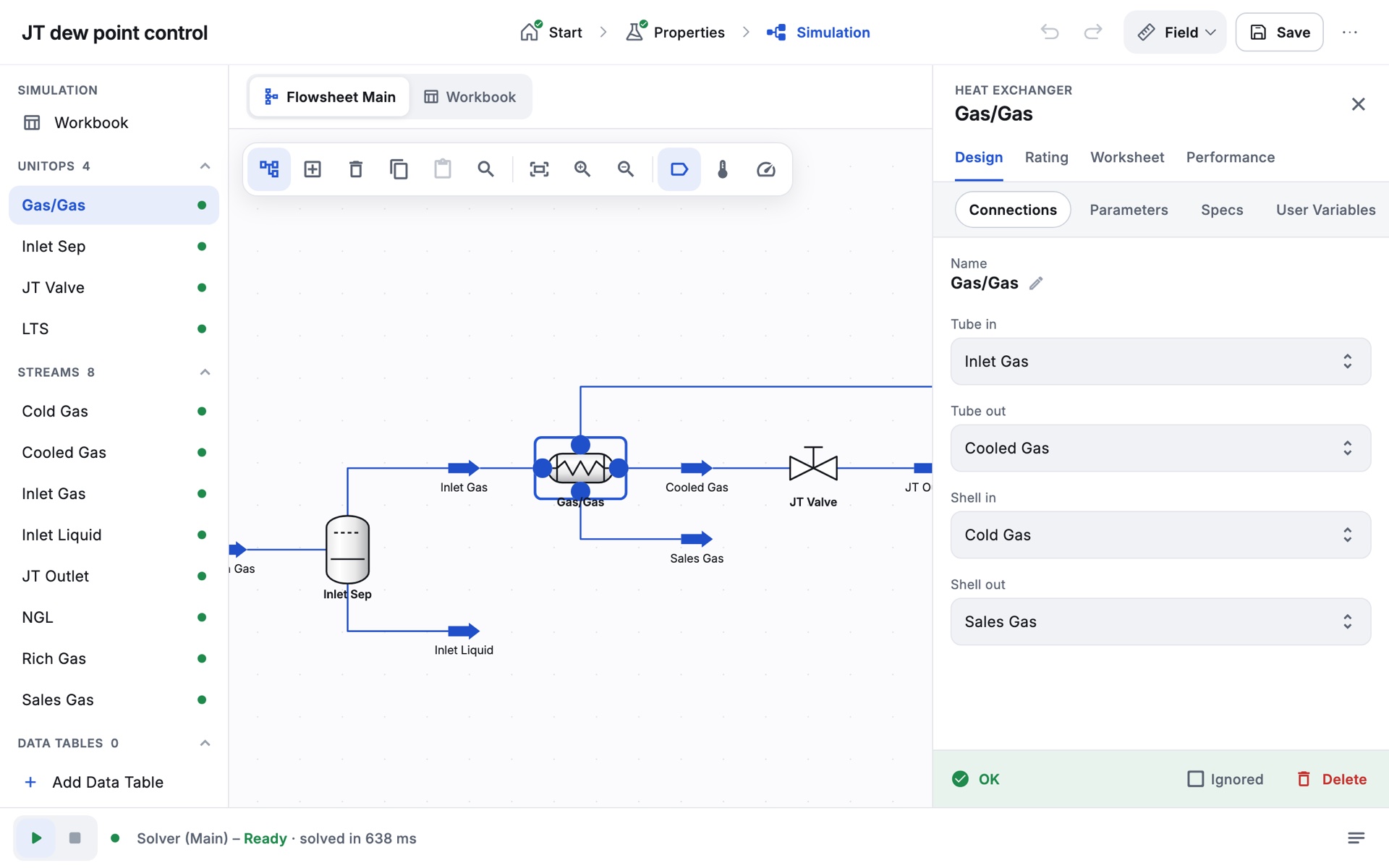
| Ports | Tube in, Tube out, Shell in, Shell out |
|---|---|
| You give | Both inlets solved, both outlets connected, and one specification on the Specs page. Tube side Delta P and Shell side Delta P default to 0. |
| Specification types | Delta Temp (between two streams you choose), Min. Approach, Duty, UA, Hot Outlet Temperature, Cold Outlet Temperature. A temperature typed on an outlet stream becomes the outlet-temperature specification. A new specification replaces the old one. |
| Results | Duty, LMTD, UA (W/K), Minimum approach |
| Rating › Sizing | Enter the overall U or the area to get the other. |
| Messages | Unknown specification, No temperature driving force, Temperature cross: duty exceeds the maximum, Specification cannot be met between zero and maximum duty |
To add a specification, open Specs, tap Add, choose the type and value (and for Delta Temp the two streams) and tap Add. The Specs page also shows the degrees of freedom; with one free it reads Add one specification (or enter an outlet temperature on a product stream). The exchanger model is the simple end-point (LMTD) model.
Pipe Segment
Calculates the pressure drop and heat transfer along a pipeline made of one or more segments and fittings. Single-phase flow uses Darcy-Weisbach with the Churchill friction factor; two-phase flow uses Beggs and Brill.
| Ports | Inlet, Outlet, Energy (heat lost) |
|---|---|
| You give | At least one segment with its length and inner diameter (Rating › Sizing), and how heat transfer is given (Rating › Heat Transfer). |
| Calculation | Normally the pipe calculates the pressure drop from the feed. If you give the outlet pressure on the outlet stream instead, leave either the feed flow empty (the pipe calculates the flow) or one pipe length empty (it calculates that length). The Calculation field shows which of Pressure Drop, Flow or Length is being calculated. |
| Results | Delta P, Heat Loss, Total Length, Elevation Change, and a Profiles page (table or plot of pressure, temperature, vapour fraction, velocity, holdup and flow regime along the pipe) |
Sizing: the length–elevation profile
Append Segment adds a column for each segment. For each, set Fitting/Pipe, length, elevation change, diameters, material (which sets the roughness) and increments (default 5). Tap Outer Diameter to open Pipe Info and pick a nominal size from Schedule 40, 80 or 160. Fittings such as 90° elbows, tees and open valves are entered with their equivalent length. Insert, Delete, Clone Segment and Clear Profile edit the profile.
Heat transfer
Choose one under SPECIFY BY: Heat Loss (0 for adiabatic), Overall HTC, Segment HTC or Estimate HTC. The last three need the ambient temperature. Estimate HTC can include the pipe wall, inner film, insulation and an outer coefficient for air, water or buried pipe in a chosen ground type.
Other pages
Calculation sets the maximum iterations (default 80) and increments. Emulsions optionally uses an emulsion viscosity for oil-water liquids (Einstein, Guth and Simha, Vand or Brinkman, with an inversion water cut).
Messages include No Segment Added, Unknown Pipe Diameter, Unknown Length, Heat transfer information under specified and Pressure falls below zero: the pipe is too small or too long.
Component Splitter
Sends a set fraction of each component to the overhead and the rest to the bottoms, without modelling how. Both products leave at the inlet temperature and pressure; the duty comes from the energy balance.
| Ports | Inlet, Overhead, Bottoms, Energy |
|---|---|
| You give | The fraction of each component to the overhead (Parameters). Entering one creates the whole list with the others at 0. |
| Results | Duty |
Shortcut Column
A quick Fenske-Underwood-Gilliland estimate of a distillation column: minimum stages and reflux, actual trays and the feed stage.
| Ports | Inlet, Distillate (or Ovhd Vapour), Bottoms, Condenser duty, Reboiler duty |
|---|---|
| You give | The light key and its mole fraction in the bottoms, the heavy key and its mole fraction in the distillate, condenser and reboiler pressures, and an External Reflux Ratio above the minimum (shown once keys and pressures are given). Top product phase: Liquid (default) or Vapour. |
| Results | Minimum and actual number of trays, optimal feed stage, condenser and reboiler temperatures and duties, section flows, minimum reflux ratio |
| Messages | The light key must be more volatile than the heavy key, Reflux ratio must be above the minimum |
Distillation Column and absorbers
Rigorous tray-by-tray columns, solved with the inside-out method. Four templates differ only in whether they have a condenser and a reboiler:
| Template | Condenser | Reboiler | Active specifications needed |
|---|---|---|---|
| Distillation Column | Yes | Yes | 2 |
| Refluxed Absorber | Yes | No | 1 |
| Reboiled Absorber | No | Yes | 1 |
| Absorber | No | No | 0 |
The Input Expert
Placing a column opens its Input Expert, a short series of pages. Move with Next > and < Prev, finish with Done, or Side Ops > to add side operations straight away.
- Connections. Column name, inlet streams and their stages, number of stages (trays; the condenser and reboiler are not counted; default 10), condenser type (Total, Partial or Full Rflx), names for the overhead, bottoms and duty streams, an optional water draw and side draws, and stage numbering (top down or bottom up).
- Reboiler Configuration (with a reboiler): a regular once-through reboiler.
- Pressure Profile. Condenser (or top stage) and reboiler (or bottom stage) pressures and pressure drops. Tray pressures vary linearly between them.
- Optional Estimates. Top and bottom temperature estimates, which help a difficult column converge.
- Specifications (not for the plain Absorber). Reflux ratio and a product rate for a distillation column; boil-up ratio or bottoms rate for a reboiled absorber.
The column view
- Design: Connections, Monitor, Specs, Specs Summary, Parameters, User Variables, Notes.
- Parameters: Profiles (tray pressures and temperature estimates), Estimates, Efficiencies, Solver (maximum iterations, tolerance and damping).
- Side Ops: side draws, pump-arounds, side strippers, side rectifiers and vapour bypasses. Each one you add comes with the streams and active specifications it needs, so the degrees of freedom do not change.
- Worksheet and Performance: summary, column profiles, plots, condenser and reboiler results, side operations.
The Monitor page is where you run the column. It shows Converged or Unconverged, the Degrees of Freedom (amber unless 0), the specification table (specified and current values, weighted error, Active and Estimate tick boxes) and the iteration history with a temperature profile. Tick and untick Active to choose which specifications the column must meet; Add Spec… adds component fractions, recoveries, cut points, draw rates, duties, reflux and boil-up ratios, temperatures and pump-around specs. Run solves, Reset clears the solution for a cold start, and Column Environment shows the internal reflux and boil-up streams.
Messages include Degrees of Freedom 1: add 1 active specification(s), Specification … has no Specified Value and Column did not converge in N iterations, sometimes with a hint such as internal flows running away.
The Gas plant sample on the Start page includes a solved depropaniser column you can explore.
Recycle
Closes a loop. Its outlet is the tear stream: give it a full estimate (composition, flow and state) so the loop can start, and Zalosim iterates until the outlet matches the inlet. Loops without a Recycle are torn automatically.
| Ports | Inlet, Outlet |
|---|---|
| Parameters | Temperature tolerance (default 0.001 K), Flow tolerance (relative) (default 10-6) |
| Results | Iterations |
| Messages | Recycle outlet … needs an estimate, Not converged in 100 iterations |
Balance
Adds up the component flows of its inlets into one outlet without any other calculation. Give two of temperature, pressure and vapour fraction on the outlet stream; vapour fraction 1 with a pressure gives the dew point of the combined streams.
| Ports | Inlet Streams (several), Outlet Stream |
|---|---|
| Messages | Over specified: give two of T, P and vapour fraction, Inlet flow is zero |